Skip to content
Miniwright Get early access

Pre-launch · early access opening in waves

Turn a 2D drawing into a 3D-printable tabletop miniature.

Sketch a character right in your browser. Miniwright reconstructs it into a 3D model, then an 8-stage print-prep pipeline hands you a watertight, correctly-scaled, based STL/3MF for resin or FDM — or it fails cleanly and never charges you for a broken file.

No 3D-modeling skills required. You draw the character — the app builds the printable file.

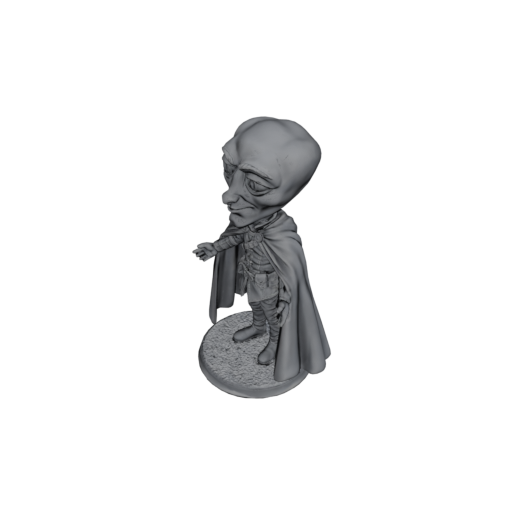
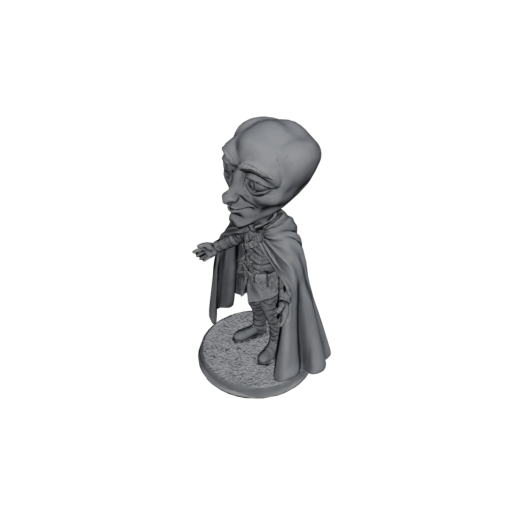
A generated 3D tabletop miniature, rendered in a three-quarter view, produced by Miniwright from a 2D drawing.

A real Miniwright generation — a 3D model reconstructed from a sketch.

How it works

From sketch to printable file in four steps

The whole product is one loop: draw, generate, print-prep, download.

  1. Draw

    Sketch your character in a full in-browser editor — freehand, shapes, layers, multi-select, zoom and pan. The white canvas is your export background.

  2. Generate

    Pick a quality tier (Draft, Standard, or Pro) and optionally add texture. Miniwright reconstructs your drawing into a 3D mesh. Credits are held, not yet spent.

  3. Print-prep

    An 8-stage pipeline — inspect, repair, scale, thin-check, base, hollow, orient, export — produces a watertight, correctly-scaled, based model for resin or FDM. If it can't, you're not charged.

  4. Download

    Inspect the result in an in-browser 3D viewer, tweak tech, scale and base for free, then download the print-ready STL/3MF. Publish to the community gallery if you like.

Reconstruction fidelity depends on your drawing and the tier you pick, and print success also depends on your slicer and hardware. The guarantee is about the file: watertight, scaled, and based — or no charge.

What's real today

A drawing tool, a generator, and a print engineer in one

Everything below is built and tested in the product — no roadmap promises.

Core

The Print Guarantee

Every deliverable file is watertight, correctly scaled to 28/32mm heroic, and based — for resin and FDM, via per-technology thresholds. If a mesh can't be repaired, the job fails cleanly and you're never charged for a broken file.

Multi-view turnaround editor

Register up to four views (front, side, back) with shared, locked proportion guides, onion-skinning, and cross-view part propagation — so the reconstruction has more to work from and the model comes out truer.

Enhancement catalog

Drop in parts — eyes, wings, hands, weapons, legs, armor, outfits — that snap to your drawing's anchors and aid your own sketch. It's an enhancement library to strengthen your art, not a build-a-figure kit.

3D preview & print-ready files

Inspect the model in an in-browser 3D viewer with an as-modeled vs. as-printed overlay. Change tech, scale, or base and the deterministic stages re-run for free. Download STL/3MF, single or in batches.

Resin and FDM

The pipeline tunes per technology — hollowing and drain holes on the resin path, wall and feature thresholds for FDM — so the file you download suits the printer you actually own.

Community gallery

Publish finished models — public, unlisted, or private — with a title, tags, and likes, then browse what others have made. Re-edit and re-export any model any time.

Business model

Credits power generations; subscriptions add perks

You buy credits to generate models. Subscriptions add recurring credits and perks like premium parts, a priority queue, and a commercial license — they don't gate quality.

Free credits

Free to start

Create an account and get free credits to explore the editor, catalog, and 3D preview.

  • Free credits on sign-up — no card needed
  • Full editor, catalog, and 3D preview
  • Draft / Standard / Pro quality, all ungated
  • Personal-use license
Get early access

Most flexible

Credit packs

Pay as you go buy what you need

Buy credits and spend them per generation. No subscription required.

  • Generations cost by tier: Draft 5, Standard 9, Pro 11 credits
  • Optional texturing: +1 credit (the STL is geometry-only)
  • Multi-view reconstruction: +2 credits
  • Top up whenever you need more — quality is never gated
Join the waitlist

Subscriptions

Hobby / Pro monthly perks

Recurring credits plus perks that go beyond quality — which stays ungated.

  • Monthly credit grant
  • Premium catalog parts
  • Priority worker queue
  • Commercial-use license (Pro)
Join the waitlist

Credit costs per generation are real; the price of credits and subscriptions is still being finalized — the tiers above show how Miniwright earns, not final dollar amounts. Payments are handled by Paddle, our Merchant of Record, which takes care of global sales tax and VAT.

About

A solo founder closing the gap between sketch and print

Miniwright is built by a solo founder. It started from a simple frustration: turning a character idea into a printable miniature meant learning 3D sculpting, or hunting for someone else's model that never quite matched what you pictured.

Raw image-to-3D tools get you a mesh, but skip the unglamorous part — making that mesh actually printable: watertight, scaled to the tabletop, and sitting on a base. Miniwright is the connective layer: a freeform drawing tool, a curated parts catalog tuned to reconstruct cleanly, and a print-prep pipeline that guarantees the file, or doesn't charge you for it.

It's early. The product is built and tested through its core phases, and early access is opening in waves while the launch is finalized. If that sounds like something you'd use, the waitlist below is the way in.

Questions? Email me@miniwright.com.

Early access

Join the waitlist

Miniwright is pre-launch and opening to makers in waves. Leave your email and we'll reach out with an invite.

We'll only use your email to contact you about early access. No spam, and you can ask us to remove you any time. See our Privacy Policy.